
As an Amazon Associate, we earn from qualifying purchases.
What is the difference between an iPad and a tablet? This is the most common question we have encountered on our contacts page and in our YouTube channel comments. Some users tend to think they are the same, while others have noticed the subtle differences.
There has been a great increase in the number of digital gadgets like tablets. Additionally, many different brands have come up with different options that have made it confusing for users to easily choose the best one for their needs.
Although they are similar and perform the same functions, there are a number of differences between the two. The first difference is in the definition. We will start with describing what an iPad is and what a tablet is. If you are wondering which one between an iPad and regular tablet is good Zoom calls, check out the linked post.
What Is an iPad?
An iPad is simply Apple’s line of tablets. These handheld computers all run on the same Apple’s iOS operating system. As the name suggests, they are all made by the Apple brand of electronics.
What Is a Tablet PC?
A tablet PC is a computer with a touch-sensitive screen and functionality similar to a laptop and internet connectivity. They are smaller and more portable when compared to laptops but are bigger and more powerful when compared to smartphones.
Instead of using a keyboard and mouse like on computers, you will use a pen to interact with the sensitive screen. However, some of them connect to a separate keyboard for a more laptop-like performance.
A tablet’s definition is simply a small touchscreen computer that is larger than an ordinary smartphone. It serves all the purposes of a smartphone and works quite impressively as a mini-computer.
As stated before, several companies produce drawing tablets. The top brands include Wacom, Huion, and GAOMON, just to mention a few. Most of these brands make drawing tablets that require a computer to use.
Android tablets and iPads are other alternatives for standalone and fully portable tablets. Although you can connect to a computer, you do not need a computer to use it. Tablets vary when it comes to operating systems, with popular ones including Google’s Android, Microsoft’s Windows, and Apple’s iOS.
iPads vs. Tablet PC Comparison
iPads are a line of tablets manufactured only by Apple Inc. Tablets, on the other hand, represent a variety of different brands manufacturing competing tablets. For example, Samsung, Windows, and Lenovo are some main players.
Tablets will run on different types of operating systems, such as Android OS, Fire OS, or Windows OS. iPads only use the iPadOS operating system. Generally, tablets offer more flexibility compared to iPads. Despite the many differences, the choice between the two will depend on users’ preferences and needs.
iPads and tablets all feature their fair share of advantages and disadvantages. We have prepared a list of strengths and weaknesses, plus the difference between the two.
Advantages of iPads over Other Tablets
Due to their powerful specifications, iPads feature faster, smoother, and more complex operation even when working with complex applications.
iPads are made on a similar operating platform to other Apple products like Apple MacBooks and iPhones. This ensures easy integration with other Apple devices by only making sure the OS is up to date.
In terms of overall user experience, Apple’s iOS comes in ahead of Google’s Android OS system for the average user. Apple’s operating system is extremely easy to use and powerful and has an intuitive interface. Windows and Android tablets are compatible with Google Play and PCs but feature poor integration with Apple products.
iPads work with the App Store instead of the Google Play Store. Like the iPad, the App Store is also owned by Apple Inc., ensuring thorough vetting of applications. It features very many applications, all compatible with iPads. Tablets rely on a third party to provide applications, which can be risky.
iPad’s social network integration ensures a better user experience when using different social media networks like Facebook and X; Android tablets lack this function.
All iPads feature a lighter build with a slimmer body, making them look modern and easier to carry around. They are made as premium-level devices with premium specifications for reliable functionality.
Overall, iPads feature better specifications compared to tablets. Android tablets used to have a better OLED screen, but since 2024, iPads have created a new iPad Pro 13 M4 tablet with an OLED screen to better compete. It still features an iOS operating system with iCloud storage.
Many iPad tablets feature better security features such as facial recognition on the iPad Pro 12.9-inch and Touch ID on the iPad Mini and iPad Air.
disadvantages of iPads
iPads are rigid, and you cannot expand the storage space after purchase. You instead have to buy a more expensive version to get larger space. It is possible to get a larger-size iPad, but it will come at a higher cost. Android tablets are flexible and can be upgraded up to 2 TB using a MicroSD card bought separately.
Tablets are far cheaper compared to iPads. They also come with more free accessories, such as the S Pen and free pen nibs. Others come with free tablet stands and keyboards as well. These accessories are not available on the iPad, with all Apple Pencils, Magic Keyboards, and accessories bought separately.
iPads are not as flexible as Windows and Android tablets when it comes to usage. Easy use on tablets makes them better options than a rigid iPad.
Android and Windows tablets feature easier customization with different applications and views. iPads are limited to only Apple Store applications just as they are without changes.
Android Tablets Advantages
Tablets come in many diverse variations that can be used for different functionalities and tasks. You will have a very wide range of options to choose from different manufacturers and variations.
If you choose Android, you can get options like Google Nexus, Galaxy tablets, or Lenovo. Windows tablets offer Microsoft Surface Pro and more. Amazon Fire OS offers Fire OS tablets and Kindle Fire. iPads come in different varieties but are all similar and from one manufacturer, which can limit them.
Tablets are cheaper compared to iPads. They also come with many additional accessories to work with. You can get multiple applications from the upgraded Google Play Store with added accessories.
Android Tablets: Disadvantages
AndroidOS is not as consistent as iPadOS. Due to the many options, OS updates are irregular, which can lead to malware risk. iOS is common across all iPad tablets, only differing in terms of versions.
Windows and Android tablets are too many, which can lead to confusion. For example, the Lenovo Tab P12, Lenovo Tab P12 Pro, Lenovo Tab P11 Pro (2nd Gen), Lenovo Tab P11 Pro (1st Gen), Lenovo Tab P11 (2nd Gen), and Lenovo Tab P11 (1st Gen) are all different tablet versions. Overall specifications like screens, RAM, screen brightness, and more on tablets are not as good as iPads.
What is the difference between iPads and tablets?

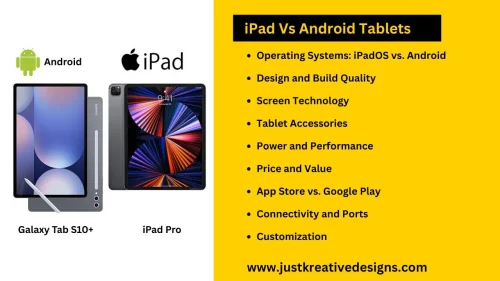
- Operating Systems
- Design and Build Quality
- Screen Technology
- Tablet Accessories
- Power and Performance
- Price and Value
- App Store vs. Google Play
- Connectivity and Ports
- Customization
Operating Systems
The main difference between iPads and Android tablets is the operating system. iPadOS is similar to iOS and macOS. It is a form of optimized operating system for iPads. It is made to seamlessly integrate with Apple products like AirDrop, MacBooks, and Mac computers. iPadOS is limited to Apple products only. Most applications and features that work on iPhones and MacBooks will also work on iPads.
Android OS, on the other hand, is used by different brands. The specifications and quality will depend on the version and other tablet specifications. You can have Android OS on different brands like Lenovo, Samsung, Google’s Pixel, and more. Overall, Android OS will offer wider flexibility and versatility while working with different applications and devices.
Different brands have the liberty to add unique aspects to their Android versions for a better experience. For example, One UI and DeX mode areboth on Samsung. Dex mode will create a laptop-like experience, while One UI will allow multitasking.
iPads are rigid and only feature improvements across their own versions, rarely including third-party options. Although these additions may slow down your tablet and also raise the price, it is still low and nowhere near standard iPadOS devices.
If you prefer using your other Apple devices like iPhones, Apple iPad offers better integration and overall powerful specifications. For those who need diversity and decent specifications at a budget price, Android is the way to go.
Design and Build Quality
Both iPad and Android devices offer a firm and sturdy build quality. All iPad models feature a metallic aluminum back with the front covered by a full screen. They have slim and stylish bezels that make them seem modern.
Android devices vary depending on the brand and price. Expensive options like the Galaxy Tab S9 and Samsung Galaxy Tab S10 have slim bezels, full front screen coverage, aluminum backs, and AMOLED displays.
All iPads have a slim and sleek build. They offer a more consistent design across all their products. The design on Android devices will depend on the version, with expensive ones offering better build quality. Cheaper and low-end versions feature a plastic back, thick bezels, and overall low-quality materials.
Both devices can be used for reading, streaming, and drawing, but iPads offer a better experience thanks to a lighter and more portable body design. You can use it for long hours without fatigue. Android, on the other hand, offers a wider range of choices, whether you need a rugged tablet for construction or a sleek professional tablet.
Display
iPads offer a more consistent screen display with Apple’s Retina in most versions. Expensive options feature XDR displays with sharp clarity and high brightness. Most iPads, even budget ones, have high resolution even with small sizes.
Premium Android tablets offer the premium AMOLED screen display, displaying quality and vibrant colors. Lower-end options have smaller and lower-resolution displays.
Accessories and Compatibility
Android-based tablets provide more free accessories than iPads. They offer pens, screen protectors, and sometimes even tablet keyboards. You will have to buy any accessories, like cases, separately for iPads, making them overall expensive. If you use multiple Apple products, iPads are the best because of their seamless integration with other Apple products.
Compatibility across the many Android devices will vary from one brand to another. For example, Samsung tablets will display better compatibility compared to Lenovo. Quality and functionality will equally vary.
User experience and interface
iPads feature a better display with many applications optimized for large displays. Android features fewer applications that are optimized for big screens. Still, in the view, iPads feature more customization options that make for a great user experience. For example, iPads have customizable screen modes such as split-screen and keyboard options.
Android also offers customizations, like the home and split screens, but the cluttered display screen is not very user-friendly. The clutter makes basic go-to applications hard to find. iOS features a minimal approach to the applications view, which I find to be way better.
Related:
Frequently asked questions
Which one is better, an iPad or a tablet?
Which is better, an iPad or a tablet? iPads are more powerful compared to regular tablets. They are, however, expensive and rigid when it comes to storage expandability. You have to buy a new one to upgrade your storage space. Android tablets, on the other hand, are cheaper, and their memory can easily be expanded using an external MicroSD card.
What is the difference between an iPad and a Samsung tablet?
First, the iPad Pro comes with an iPadOS, while Samsung tablets run on Android operating systems. All iPads are manufactured by Apple Inc., while Samsung tablets are made by Samsung.
iPads are expensive and do not come with a pen or any other accessory. Samsung tablets, on the other hand, are cheaper and come with an S Pen and free nibs.How can you choose an iPad or Android tablet?
The choice between an iPad and a tablet depends on the intended final use of the tablet. When choosing between the two, you need to consider the following factors:
iPads provide a more user-friendly and upgradable operating system compared to tablets. They also have a brighter, more colorful, and clearer display than their counterparts.
Android tablets provide a cheaper option with upgradable storage using an external MicroSD. iPad storage comes in many varieties but is not upgradable.
Android tablets come with more accessories compared to iPads. For example, you get a free S Pen when you buy most Samsung tablets. iPads do not come with any accessories. You have to even buy the Apple Pencil 2.
Android tablets provide a wider range of choices and a variety of devices to choose from.Is an iPad a tablet?
An iPad is a tablet that runs on the Apple iOS operating system. It is similar to regular tablets but still differs a lot in terms of specifications and accessories available. Generally, iPads are more powerful than regular tablet devices.
Which one is better, an Android tablet or an iPad?
iPads are considered by many people to be the better device due to their seamless connectivity with other Apple devices. It also packs more processing power and will not lag when used with different complex applications. Android tablets are cheaper and come with many free accessories. They also work perfectly with Play Store applications to provide a wide range of applications and gaming choices.
What is the difference between a Kindle Fire and an iPad?
The Kindle Fire runs on Google’s Android OS, while iPads run on Apple’s iOS. This means that the Kindle Fire differs from an iPad just like other Android tablets mentioned above.