
As an Amazon Associate, we earn from qualifying purchases.
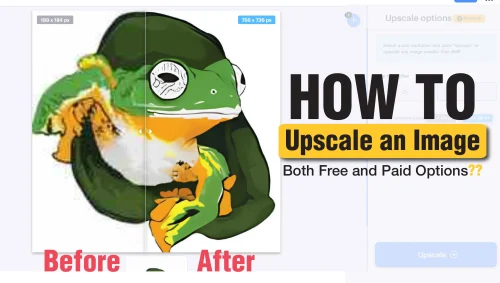
When you try to upscale an image, you’re basically enlarging it without losing its quality. However, enlarging a very small image will result in a gradual loss of quality. This is evident with the blurring of the image and pixelation. The resulting image can not be printed or used in different media due to poor clarity. Luckily, it is possible to solve this issue by upscaling your image.
Image upscaling refers to increasing the size of your image without losing clarity or resolution. It involves stretching the image and increasing the quality. This procedure will help increase the quality of your work, leading to more interaction. The skill of upscaling is a lifesaver for photographers, designers, and creatives.
You have the option of using both paid and unpaid options you can use to upscale your images. Different upscaling approaches result in different outcomes. In this post I will explain the options I use most and why. You can use either online or offline methods.
High quality images are an important part of good or professional graphic design. Failing to use good quality images can result to a poor overall low quality look.
5 Easy Methods to Upscale an Image
- Free Online Websites to Upscale an Image (free)
- Free downloadable software options (free)
- Mobile Apps for Free Image Upscaling (free)
- Professional tools for upscaling (paid)
- Subscription-Based Online Platforms (Paid)
Free Methods to Upscale an Image
Free methods to upscale an image can either be in the form of online tools and websites or downloadable software. iLoveimg, Waifu2x, ImgUpscaler, and Let’s Enhance are examples of websites for upscaling. They are not entirely free for use and will either add watermarks or limit the number of images you can upscale per day. The process you follow with these websites is the same for all of them.
For this category, I recommend iLoveimg for the best experience.
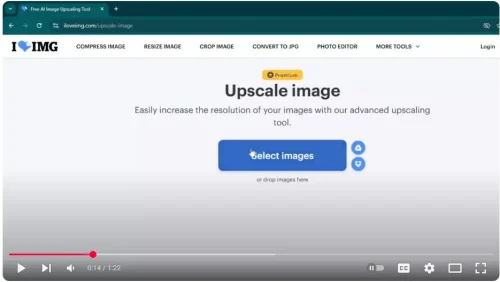
Step 1: Upload your image.
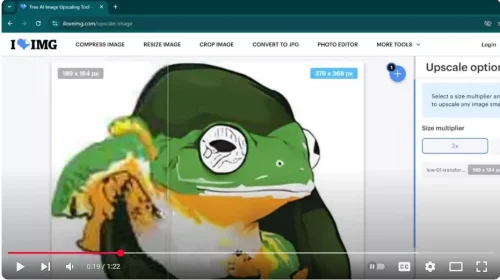
Step 2: Choose the level of upscaling (2x or 4x).
Step 3: Hit upscale.
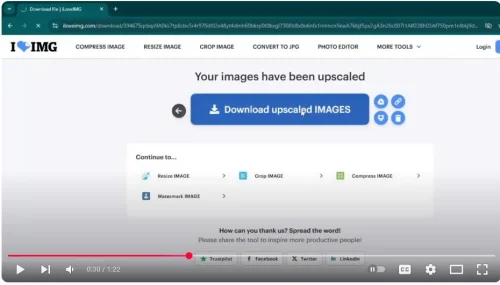
Step 4: Download the final result.
Free Software Options
Alternatively, you can use free software like Upscayl, Paint.NET, and GIMP (GNU Image Manipulation Program). Some offer controls for resizing, while others use plugins that upscale images. If you are looking for a free Photoshop Alternative, we recommend GIMP.
Upscayl is my top choice, although it is heavy and will cause system lags, especially if you have a less powerful system. The best part is that it is totally free and does not require any plugin to work.
Mobile Apps for Upscaling
Upscayl does not work with mobile. If you are using a smartphone, you can upscale using Remini and EnhanceFox. These apps are recommended for image restoration and improvement.
Paid Methods to Upscale an Image
Many free tools come with disadvantages and limits, like low resolution, occasional watermarks, usage limits, and more. If you are a professional and need paid alternatives, you can either use professional applications or subscription-based online platforms.
When using professional tools like Adobe Photoshop, you can either adjust sharpness, reduce noise, and fine-tune details manually or use a plugin like Preserve Details 2.0.
Topaz Gigapixel AI is advanced online software. Thanks to its powerful AI ability to upscale to 600% and maintain texture and detail. We recommend it for pro graphic designers and photographers.
Alternatively, you can subscribe to online services like VanceAI, Fotor, and Let’s Enhance (premium version). They offer different subscription plans to choose from. Batch processing is one of the key advantages of these software.
Best Applications to Upscale an Image: My Top Picks
ILoveimg: No need to install
ILoveimg is one of my favorite options in this category. You can easily use it without having to install it on your computer.
You simply have to use the application on your browser with an internet connection. Unfortunately, it is a paid service and can only upscale 2 images in 24 hours.
This is good for me but is quite limited. Luckily, you have a lot of additional applications on the site, such as an image compressor, a photo editor, and an image converter to JPEG from any format.
To use the upscale, go to the official website.
Select images and navigate to your image. You can also drag and drop your image to the big blue button. The image is uploaded, and the upscale process begins. Below is an example of a low-resolution image.
Once uploaded, you can choose how big you need the image to be upscaled to. You can choose either 2K or 4K upscale options.
The 2K option is smaller at 736 x 736 pixels, while the larger one is 15 bigger. Below is the 4K upscale option. It measures 1472 x 1472 px. Click the upscale button, then download the upscaled image. your image. Below is the upscaled image.
Once you upscale 2 images, it will prompt you to make payments.
Upscayl—Offline upscaler
Unlike the Iloveimg, which is online and used without installing it on your computer, the Upscayl is the best offline upscaler. You have to install it on your computer to start using it.
It is system-intensive and will lag for a while as you start upscaling your document. Upscayl is compatible with both PC and Mac. Be careful when choosing your version.
Download and install the application. To use it, choose the select image option and navigate to your low-resolution photo.
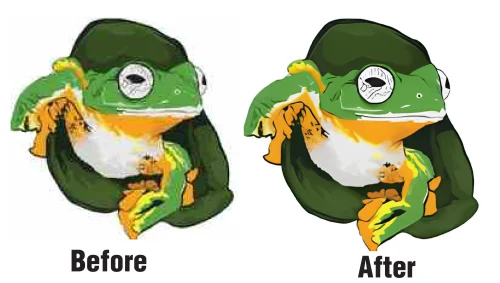
Choose the settings you want, then click upscale. The image is upgraded and downloaded in the same folder as the original one. Below is the larger image after upscaling.
Image Quality and Resolution: All You Need to Know
There are different factors that affect an image’s quality. These factors are the difference between a low-resolution and an upscaled one.
Dots per inch, or DPI in short, is used for printing work. Higher DPI means better quality. For the best output, choose 300 dpi. Having it too high can cause unintended clarity issues. Literally it means the number of dots within an inch in an image. More dots mean higher quality.
PPI (Pixels Per Inch) is similar to DPI but for screens like tablets and phones. It is referred to as pixel density. Higher PPI results in better clarity.
The number of pixels in your image refers to resolution. Higher resolution results in sharper images. Full HD 1920×1080 pixels is clear, while 4K 3840×2160 pixels is clearer.
After upscaling, you can now easily remove white background from your images.
Related: Flip an image in Adobe Illustrator
Frequently Asked Questions
What is image upscaling?
Image upscaling refers to increasing the size of your image without loosing clarity or resolution. It involves stretching the image and increasing the quality.
How can you Upscale an Image Online?
First, upload the image to the tool you are using. Choose the desired scale size like X2.
You can enable additional features if available and necessary. Hit upscale to start the process then download.