
As an Amazon Associate, we earn from qualifying purchases.
If you are on a budget, the best Huion drawing tablets will be a good alternative to the expensive Wacom tablets. Although they do not look as premium as their counterparts, they are reliable and user-friendly tablets that will not disappoint.
Whether you need cheap pen tablets, Huion tablets with a screen, or even pen computer tablets, Huion has it all. Their low price, versatility, high precision, good resolution, and compatibility with graphic design and illustrative applications make them a contender for the best drawing tablet spot.
These tablets are ideal for beginners, students, professionals, or anyone on a budget. In this post, we have researched and compiled a list and review of the best Huion tablets you can buy.
We have considered important aspects of a good drawing tablet to help you easily understand. Some of the considerations include display, stylus pen, build quality, stylus pen, sensitivity, pen pressure, price, and more.
If you want to compare Huion and other tablet brands, check out our post.
- Huion Kamvas Pro 24: Best overall
- Kamvas 24 Plus: Best Pen Display Tablet
- Huion Kamvas Pro 13: Budget Pen Display Tablet
- Huion Kamvas 16: Large Screen size
- Huion H430P: best budget Huion graphics tablet
- Huion Inspiroy Keydial KD200: Best with a keyboard
- Huion Kamvas Studio 16: iPad Pro alternative

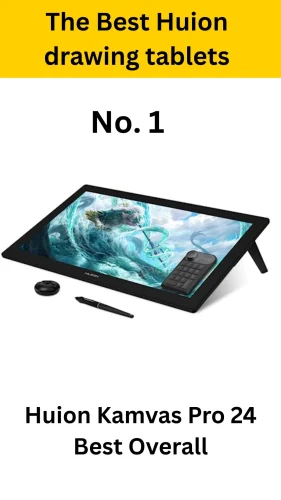
Huion Kamvas Pro 24: best Overall Huion drawing tablet
- Screen size: 24 inches
- Resolution: 3840 x 2160 Pixels 4K
- Screen Type: Full Lamination, Anti-glare Etched Glass
- Color Accuracy: 140% sRGB
- Pen Pressure: 8192 levels
- Battery-Free Stylus: PW517
- Pen Resolution: 5080 LPI
- Tilt Recognition: +-60
- Connectivity: HDMI, DP, USB-C, DC, USB-A 2.0
- Integrated Stand 20°
- Compatibility: Windows 7 or later, macOS 10.12 or later, Android, Linux
The Huion Kamvas Pro 24 is our pick for the best overall option. It has the best drawing tablet screen of all Huion tablets, with a large 24 inch screen size and 4K resolution at 3840 x 2160 pixels.
Like many other premium Huion tablets, the IPS screen is fully laminated with anti-glare etched glass. This makes it both sturdy and clear by eradicating any chances of air bubbles forming in between the three-layer fused screen.
It comes with a nice battery-free digital pen, the PW517which is perfect for drawing. The pen features will fuse with the screen to create a unique pen-to-paper-like feel when drawing.
A wide +-60 tilt angle and high pressure level are ideal for creating different types of strokes with minimal hustle. One downside of the Huion Kamvas Pro 24 4K is the absence of shortcut keys, which come in handy to speed up your workflow. Kamvas 24 is also a premium tablet and will not come cheap. But you will for sure not regret the massive power and reliability of this tablet.
Pros
- Large screen with high 4K resolution
- A clear, fully laminated screen with minimal parallax
- Free PW517 Stylus with high pen pressure levels.
- Battery free stlus
Cons
- Expensive
- Must connect to a computer
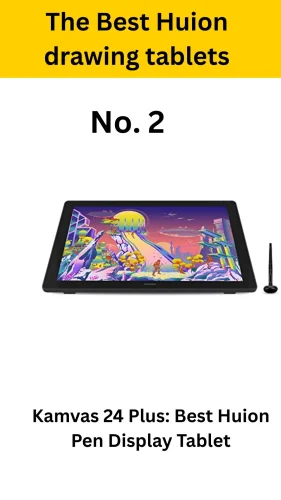
Kamvas 24 Plus: Best Huion Pen Display Tablet

- Screen size: 24 inches
- Resolution: 2560 x 1440 pixels
- Screen Type: Full Laminated, Anti-glare Etched Glass
- Color Accuracy: 140% sRGB
- Pen Pressures: 8192 levels
- Connectivity: HDMI, DP, or VGA
- Compatibility: Windows/MacOS
- Battery-Free Stylus: PW517
- Pen Resolution: 5080 LPI
- Tilt Recognition: ±60
A 4K screen packs more power than you will need for digital art. A full HD or 2.5K resolution skill will still be good for drawing.
The Huion Kamvas 24 Plus is the second best. It has a similar screen to the Kamvas 24 Pro at 24 inches and is a fully laminated type. It only differs with 2.5 K, or 2560 x 1440 pixels, resolution instead of 4 K.
First of all, the large screen will amplify your artwork with rich and vivid colors. It also features a 1200:1 contrast ratio, making it produce a great view.
The PW517 stylus is accurate and packs great features. This therefore enhances your expected output.
Although it is pricey, it is suitable for experts. Unlike other tablets in this category, it provides a wide connectivity variety with three ports, namely VGA, DP, and HDMI. Finally, it is compatible with both Windows and Mac OS. Unfortunately, it does not work with Android or Linux.
Pros
- Large screen with 2.5K resolution
- The PW517 stylus is a good pen with powerful specs.
- Variety of connectivity options
Cons
- Compatible with Windows and Mac OS, but not Android or Linux.
- Expensive
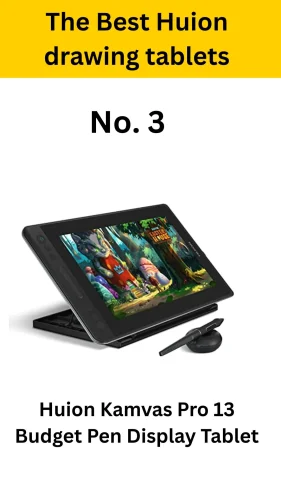
Huion Kamvas Pro 13: Best Budget Pen Display Tablet

- Screen size: 13 inches
- Resolution: 1920 x 1080 pixels
- Screen Type: Full Lamination, Anti-glare Matte Film
- Color Accuracy: 120% sRGB
- Pen Pressure: 8192 levels
- Battery-Free Stylus: PW517
- Pen Resolution: 5080 LPI
- Tilt Recognition: ±60
- 8 Programmable Press Keys
- Connectivity: USB-C, Full-Featured USB-C
- Compatibility: Windows 7 or later, macOS 10.12 or later, Android , Linux
If you are on a budget but still need a tablet with a decent screen, we recommend the Huion Kamvas Pro 13. This is an affordable option, but it still maintains a fully laminated display.
The screen still displays rich and vivid colors thanks to its 120% sRGB color accuracy and 1920 x 1080 pixels Full HD resolution.
Although it is far cheaper, this tablet has some features that are not even present in the more expensive options. For example, it has eight free customizable keys that will help speed up your workflow.
It is also easily compatible with Android devices, which is perfect. Just like the Kamvas Pro 24 and Plus 24, it comes with a powerful PW517 stylus, which is ideal for drawing.
Pros
- Tilt Recognition
- Full HD, fully Laminated screen with Anti-glare Matte Film
- Free express keys
- Precise color accuracy at 120% sRGB color gamut
Cons
- Small screen size
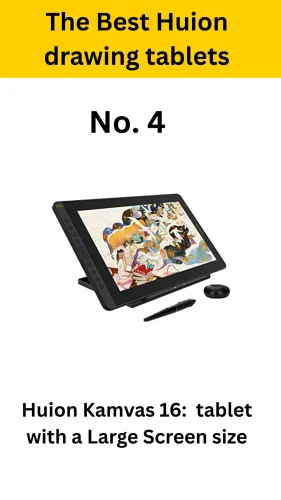
Huion Kamvas 16: Huion tablet with a Large Screen size

- Screen size: 15.6 inches
- Resolution: 1920 x 1080 Pixels
- Screen Type: Full Lamination, Anti-glare Etched Glass
- Color Accuracy: 120% sRGB
- Pen Pressure Levels: 8192 levels
- Battery-Free Stylus: PW507
- Pen Resolution: 5080 LPI
- Tilt Recognition: ±60
- 6 Programmable Press Keys
- Connectivity: USB-C
- Compatibility: Windows 7 or later, macOS 10.12 or later, ChromeOS 88
The Huion Kamvas 16 is a slightly larger option with very similar features. It features a 15.6-inch screen and a 1920 x 1080 full HD resolution. You will have six free programmable press keys, slightly less than the Kamvas 13 Pro. Six keys will be more than you need for basic drawing.
On purchase, you will get a free PW507 with 5080 LPI resolution and +/- 60 degrees tilt recognition, just like all the tablets above. You will also get a free ST200 stylus to support the tablet as you draw.
Pros
- Affordable Price range
- 6 free Programmable Press Keys
- Free PW507 with 8192 levels
Cons
- Too Bulky to carry around
Huion H430P: Best Huion Pen Tablet

- Working area: 4.8 x 3 in.
- Pen: PW201
- Resolution: 5080 LPI
- Pen pressure sensitivity: 4,096 levels
- Connections: Micro USB
- OS: Windows or macOS
- 4 programmable express keys
- Weight: 135g
If you are looking for a cheap tablet to start digital art, you can consider the Huion H430P. This is the perfect match for you. It contains all the basic features suitable for starters.
First, it comes with the PW201 pen, which features moderate pen pressure sensitivity at 4096 levels. This is lower than other premium Huion tablets but ok for beginners. Secondly, it is compatible with both the OS and Windows operating systems.
It does not have a screen but comes with a sensitive drawing area that is just enough, measuring 4.8 by 3 inches. The Huion H430P is small and compact and easily fits in most backpacks or pockets. It is the cheapest tablet that you can buy.
Unfortunately, it is a pen tablet and does not have either a computer or a screen. You must connect to a computer to use it and look at the computer display as you draw.
Pros
- Affordable Price range
- Small and compact
- Compatible with Windows and MACOS
Cons
- No screen or Computer
Huion Kamvas Studio 16: iPad Pro alternative

- Screen size: 16 inches
- Resolution: 2560 x 1440 pixels
- Screen Type: IPS Full Lamination, Anti-glare Glass
- Aspect Ratio: 16:9
- Brightness: 400 nits
- Pen Pressure Levels: 8192 levels
- Processor: Intel Core i7
- RAM: 16 GB
- Storage: 512 GB SSD
- Compatibility: Windows/MacOS
If you are looking for a tablet that can be used as an iPad Pro alternative but from Huion, we recommend the Huion Kamvas Studio 16 or Huion Kamvas Studio 24. Both these tablets were recently released to replace the Huion Kamvas Studio 22 as computer tablets.
They have both a screen and an inbuilt computer, making it possible to install software. This means that you will not need to connect them to a computer to use them.
The Kamvas Studio 16 features a smaller screen at 16 inches, while the Kamvas Studio 24 comes with a 24-inch screen size. However, both of them pack powerful features that allow them to be easily considered as laptop alternatives.
For example, they come with an Intel Core i7 processor similar to processors found on many premium-level laptops. To sum up the processing power, they come with up to 16 GB of RAM. This RAM is large enough for any complex task you might be undertaking.
Pros
- No computer needed
- Best iPad alternative
- Fast processor and large RAM
Cons
- Expensive
- Cheaper Kamvas Slate 10 and 11 now available
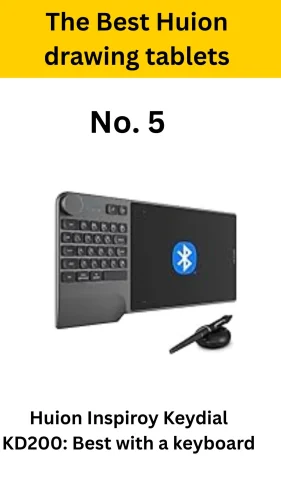
Huion Inspiroy Keydial KD200: Best with a keyboard

The Huion Inspiroy Keydial KD200 is a small Huion tablet that features a small drawing area and a right-handed keyboard on the side. You can set these keys to different quick-go-to shortcuts you normally use to significantly speed up your workflow.
The current version has the keyboard on the left, thus only serving right-handed users. Although they have shared images and videos for the left-handed version, it is yet to be released.
Compared to other versions, the Huion Inspiroy Keydial KD200 is very affordable, making it ideal for beginners and users on a budget.
Pros
- Free keyboard available
- Firm body and build
- Affordable Price
- Many shortcut keys
Cons
- Steep learning curve taking too long to get used
- No left handed version
Choosing the Best Huion Tablets
Below are some of the most important considerations you need to have in mind when choosing the best tablet if you are a beginner. Before you can consider them, you must first understand the different types of drawing tablets.
Pen pressure sensitivity and resolution
High pen pressure will ensure a pen-to-paper-like feel when drawing. Choose a tablet with a stylus pen pressure of at least 8192 levels. You will also create strokes seamlessly, even in different thicknesses and smoothnesses. For clear strokes, choose a pen with at least 5080 LPI, or lines per inch, resolution.
Screen size and resolution
A large tablet screen will provide a better user experience than a smaller one. However, if it is too big, it will limit portability on your device. Additionally, most large tablets are slightly more expensive than those with no screen but a sensitive working area.
If you are on a budget, we recommend pen tablets, but for the best user experience, just use a pen computer tablet.
Connectivity options
Make sure the tablet you choose is compatible with your drawing software and operating systems. Additionally, different tablets use varying connectivity options. Some use wireless connectivity, while others use a USB-C connection. The pen can also be charged wirelessly using EMR, or electromagnetic resonance, or using wired methods.
Make sure you understand your tablet’s connectivity and compatibility before buying.
Budget and value for money
The price of a tablet will depend on the different specifications and tablet type. Consider your needs and set a budget before choosing your tablet. You need to also check the number of free accessories that come with the tablet for the price. This includes free stands, drawing gloves, drawing applications, pens, and nibs. The more accessories, the better deal you get.
Shortcut Keys
Shortcut keys allow you to set your quick go-to functions. This will increase your overall workflow speed. The more shortcut keys, the better the user experience. Some tablets have additional shortcut keys on the body and stylus pen. Choose a tablet with many options.
7 Best Huion Tablets List
- Huion Kamvas Pro 24: Best overall
- Kamvas 24 Plus: Best Pen Display Tablet
- Huion Kamvas Pro 13: Budget Pen Display Tablet
- Huion Kamvas 16: Large Screen size
- Huion H430P: best budget Huion graphics tablet
- Huion Inspiroy Keydial KD200: Best with a keyboard
- Huion Kamvas Studio 16: iPad Pro alternative
Frequently Asked Questions
What is a graphic tablet?
A graphic tablet or pen tablet is a tablet that does not have an inbuilt screen or computer to install software. Instead of a screen, it has a sensitive working area. You have to connect it to a computer to use. Pen tablets truly on computers for both the screen and software installed in the computer. Huion H430P and H610 are perfect options.
What is a Pen Display Tablet?
A Pen display tablet has a screen but no computer to install applications. You will have to connect to a computer to use the software installed on the computer. You will however view and draw your work on the tablets screen.
What is a Pen computer tablet?
A pen computer tablet has both a screen and an inbuilt computer. It does not need a computer to use. It can be considered as the best alternative for iPads and Android tablets. Kamvas Studio 16, Studio 22, Kamvas Slate 10 and 11 are the best picks.