
As an Amazon Associate, we earn from qualifying purchases.
The Huion Kamvas 13 (Gen 3) is a new pen display released in 2024. With the very many pen display tablets in the market, choosing the best one is not easy. In this post we will help you compare this tablet with the new XP-Pen Artist 13.3 Pro V2 released on September 19, 2024 to help you choose the best one. If you want a cheaper but older XP Pen tablet, we recommend the Artist 13 (Gen 2).
To come up with the best among the three, we will consider a number of important considerations that make a good drawiging tablet. We will explain each of and them the pass a verdict after every specification. Some of the key considerations include Screen and display, stylus pen, design and build, connectivity, perfomance, price and value.
Huion Kamvas 13 (Gen 3) Specifications

Specifications
- Product Name: Kamvas 13 (Gen 3)
- Colors: Sakura Pink / Cosmo Black
- Panel Size: 13.3 inches (diagonal)
- Resolution: 1920 x 1080 (FHD)
- Pixels Per Inch: 166 PPI
- LCD Type: IPS, 60Hz
- Active Area: 293.8 x 165.2 mm
- Contrast Ratio: 1000:1
- Brightness: 288 nits
- Response Time: 25 ms
- Viewing Angle: 85°/85°/85°/85° (H/V)
- Color Gamut Volume: 120% sRGB
- Color Coverage: 99% sRGB / 99% Rec.709 / 90% Adobe RGB
- Display Colors: 16.7M (8-bit)
- Surface: Anti-glare etched glass (2nd Gen)
- Full Lamination: Yes
- Pen Technology: PenTech 4.0
- Pen Pressure Levels: 16,384
- Pen Resolution: 5080 LPI
- Reading Height: 10 mm
- Tilt Recognition: ±60°
- Pen Model: PW600L
- Touch Support: No
- Programmable Keys: 5 +3 on pen
- Dial Controllers: 2
- Function Buttons: 2
- Input Power: 5V 2A (via USB)
- Dimensions: 361.2 x 202.8 x 11.7 mm
- Weight: 865 g
- OS Compatibility: Windows 7+, macOS 10.12+, Android, Linux
Display
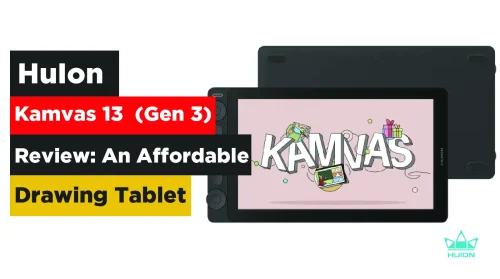
The Kamvas 13 Gen 3 features a large 13.3-inch Full HD screen with a resolution of 1920×1080 pixels. For a clear display with minimal parallax, the screen uses full lamination technology with three layers combined.
This IPS display offers improved pen-to-screen interaction and better accuracy than most entry-level models. To protect your eyes and enhance display quality, the second-generation anti-glare etched glass reduces reflections and provides a paper-like texture.
The screen delivers solid color accuracy thanks to its 99% sRGB and 90% Adobe RGB color gamut coverage. This makes it excellent for printing, sketching, and other creative work.
The screen surface has been upgraded to anti-glare canvas glass for better durability compared to the anti-glare film on the older Kamvas 13. This version uses nano-etching technology to reduce both glare and sparkle, minimizing image noise especially under white backgrounds.
The XP-Pen Artist 13.3 Pro V2 13.3-inch features a fully laminated display with a Full HD 1920×1080 pixel resolution. It looks big with a landscape orientation thanks to the aspect ratio of 16:9.
If you are a designer or illustrator, the 99% sRGB, 89% Adobe RGB, and 95% DCI-P3 coverage, and 250 nits brightness provide a vibrant display with rich, true-to-life colors.
You can use the screen both indoors and outdoors. When testing, we noticed that the screen was not very clear when used in very high light conditions.
Full lamination and anti-glare (AG) coating eliminate air gaps between the pen tip and display, reducing parallax for precise stroke placement. It also ensures screen and overall tablet durability thanks to a firm and sturdy build.
Stylus Pen
The Kamvas 13 Gen 3 stylus has been upgraded to the PW600L with the latest PenTech 4.0 technology. It now offers 16,384 pressure levels and 60° tilt support double the sensitivity of standard tablets with 8,192 levels.
Thinner pen nibs and tilt auto-alignment allow for a better, more natural drawing experience with no noticeable parallax. The pen’s 2g initial activation force enables the creation of fine strokes with ease.
The PW600L stylus is ultra-responsive, making it ideal for fine line work and expressive strokes. It features three customizable side buttons that allow for faster navigation. The ergonomically designed grip ensures comfortable use over long sessions.
The X3 Pro Smart Chip Stylus on the XP-Pen Artist 13.3 Pro V2is arguably the star of the upgrade. With 16,384 pressure levels—double the previous generation—the stylus responds with incredible nuance, especially when shading or applying variable pressure.
It supports a 60° tilt, essential for sketching, inking, and natural shading. The felt nibs give you paper-like friction, which adds control and familiarity, especially for artists transitioning from traditional media.
Additionally, two programmable buttons and a digital eraser are built-in, and the soft silicone grip makes long drawing sessions more comfortable. The stylus requires no battery or charging, further improving usability.
Design and Build
For easy portability, the Huion Kamvas 13 Gen 3 tablet features a lightweight body at 865 g and a slim 11.7 mm thickness. It feels firm and durable despite being made of matte plastic.
The front features a near edge-to-edge display with slim, modern-looking bezels. In addition to the three shortcut keys on the pen, the tablet includes five programmable buttons and two dials on the body. These can be customized to fit your workflow for greater productivity. You can choose between two colors: Cosmo Black or Sakura Pink.
The XP Pen Artist Pro V2 tablet on the other hanf measures 390.4 x 249.98 x 12.9 mm and weighs only 1.139 kg, making it extremely portable. It features a matte black chassis with a signature red dial, offering a premium feel for a mid-range device.
The build is sturdy yet sleek, and the eight programmable shortcut keys alongside the dial make frequent tool switching or zooming fluid and efficient. Whether you’re working at a desk or traveling with your setup, it’s lightweight and compact enough to carry with ease.
Connectivity
Huion Kamvas 13.3 (Gen 3) supports both USB-C to USB-C and 3-in-1 HDMI connectivity. Only the 3-in-1 HDMI cable is included in the box; the USB-C to USB-C cable must be purchased separately.
As a pen display, the tablet has a screen but no built-in computer. You can connect it to Windows, macOS, Android, and Linux devices. Android compatibility also means you can use the Kamvas 13 Gen 3 with Smartphones.
With a USB-C port, the Artist 13.3 Pro V2 eliminates bulky 3-in-1 cables found in earlier models. This not only makes it easier to plug in but also enables broader Android and ChromeOS compatibility.
Just ensure your Android device supports USB 3.1 DP1.2 for display output. USB-C is important here because it simplifies connections and helps maintain a tidy, modern workspace.
Price and Value
The Huion Kamvas 13 (Gen 3) is very affordable and offers great value. It is priced at only $269. The XP-Pen Artist 13.3 Pro V2 which is a worthy successor to the original XP-Pen Artist 13.3 Pro (2019), brings an improved premium drawing experience, it has better stylus technology, and broader compatibility.
Despite the additions, it still maintains an affordable $230 price. The Artist 13.3 Pro V2 was released on September 19, 2024, as an upgrade tailored for digital artists seeking portability, precision, and power without compromising on affordability.
XP Pen Artist 13.3 Pro V2 vs Huion Kamvas 13 (Gen 3) Drawing Experience
Overall, the drawing experience on both tablets is smooth, responsive, and natural. The combination of high pressure sensitivity, minimal pen retraction, and a matte laminated screen gives the feel of real paper.
Artists report excellent stroke accuracy, a satisfying tactile response, and a noticeable upgrade from older or entry-level pen displays. Whether you’re sketching, inking, or painting, the Pro V2 adapts fluidly to your hand’s movement.
The XPPen Artist 13.3 Pro V2 is ideal for intermediate digital artists, illustrators, and designers seeking a professional feel without the pro-level price. Its balance of performance, portability, and affordability makes it especially suitable for students, freelancers, and hobbyists upgrading from non-display tablets.
Artist 13.3 Pro V2 vs Artist 13 (2 gen) Specs comparison
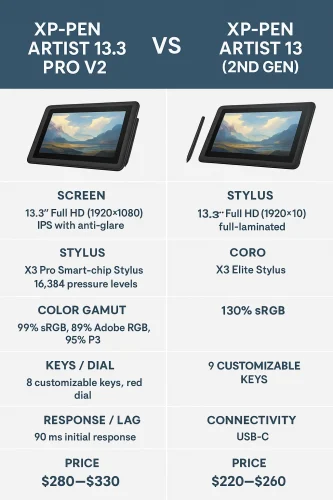
XP Pen Artist 13.3 Pro V2

Frequently Asked Questions
Do you need to connect the Huion Kamvas 13 (Gen 3) to a computer?
Yes, the Huion Kamvas 13 (Gen 3) is a pen display tablet. You must connect the monitor to a computer or Smartphone to use.
What is the difference between Huion Kamvas 13 and 13 Pro?
The main difference between Kamvas 13 and Kamvas 13 Pro is in the aspect ratio and resolution. Huion Kamvas Pro 13 (2.5K) features a larger 16:10 aspect ratio and 2560×1600 resolution. On the other hand, Kamvas 13 only comes with a 16:9 aspect ratio and 1920×1080 pixels of resolution.What is the difference between XP Pen Artist 13.3 Pro V2 and XP-Pen Artist 13.3 Pro?
While the size and red dial design remain the same, the Pro V2 leaps ahead in key areas. These improvements significantly enhance the user experience and drawing precision. They include
Stylus upgrade from 8,192 levels to 16,384 and a better tilt and activation force. It also has an improved color gamut (now 99% sRGB vs. ~88% in the original) plus higher report rate (≥200 RPS) and tighter accuracy. The screen is also Fully laminated to reduce parallax view and offer better clarity. You will get free pen nibs and a better pen grip and finally, USB-C support, improving cable management and device compatibility