

As an Amazon Associate, we earn from qualifying purchases.
Choosing the best tablet for reading and drawing or gaming devices will differ a lot. It is important to understand what to consider as you choose clearly.
- What are the best tablets for reading PDFs?
- Amazon Kindle Paperwhite: Best Overall
- Kindle Oasis – Best Runner-Up
- Samsung Galaxy Tab S9+ – best Android
- Kindle Scribe: Best for reading and Taking Notes
- Microsoft Surface Pro 9 – Best Laptop Alternative
- Amazon Fire HD 8 Kids Tablet (12th generation) – Best Budget
- 13-inch iPad Pro (2024): best iPad for reading books
- What to Look for When Choosing a PDF Reading Tablet
- Types of reading Tablets
- Best Tablets for reading PDFs and Taking Handwritten notes
- Frequently Asked Questions
- What is the best reading tablet?
- Which tablet size is best for reading?
The tablet field is filled with many different tablet types that are meant to serve different functionalities. You can choose Apple iPads or Android-based tablets that can run on an Android OS. Amazon Fire and Kindle tablets are slightly different compared to iPads and Android devices.
In this article, we have picked the top reading tablets that you can buy plus their different types and most important specifications to check for a good reading experience.
What are the best tablets for reading PDFs?
When choosing the best reading tablets, we took into consideration some important specifications to compare tablets. The tablet’s price, screen size, night light reader setting or screen brightness adjustability, battery life, and storage space were some of the key factors on top of our list.
From the above and more specifications, we found the Kindle Oasis to be the best. Its large 8 GB or 32 GB space was able to save many PDF and book files for future reading.
Fast charging and long battery life will allow you to read for very long without having to always recharge. This makes it flexible and a huge time saver when working remotely or out of the office.
- Amazon Kindle Paperwhite: Best Overall
- Kindle Oasis – Runner Up
- Samsung Galaxy Tab S9 Plus – best Android Tablet for reading Pdfs
- Amazon Kindle Scribe – For reading and note-taking
- Amazon Fire HD 8 Kids Tablet – Best Budget
- Samsung Galaxy Tab A7 Lite: Best for Comics
- Apple iPad Pro (2024) – Best iPad
- Remarkable 2: Best Budget
Amazon Kindle Paperwhite: Best Overall
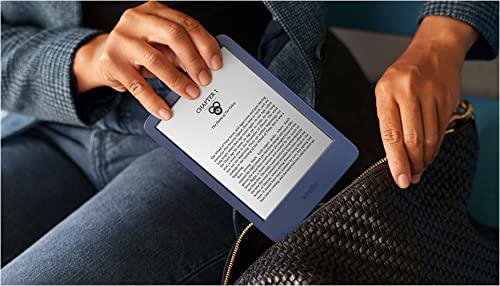
- Screen size: 6.8” Paperwhite
- Built-in light
- 300 ppi
- Optimized font technology
- 16-level grayscale
- Water Proof
- 16 GB storage
The Amazon Kindle Paperwhite is the best available option. It features Up to 10 weeks of battery life, after taking only 5 hours of full charging. Overall the tablet is waterproof making it durable and usable for many years without damage.
If you like reading away from the office, you have a light 205 grams weight on the small size 7-inch tablet. The screen, just like many other E-readers is bright with high contrast between black and white areas for maximum book-like reading capability.
It is 6.8 inches in size with 300 ppi resolution. To save your readable books, you will have 16 GB which is more than you need because most PDFs are usually small in size.

Pros
- Long 10-week battery life after 2.5 hours of charging time
- Compact screen size
- Bright display
- Small 7-inch and Lightweight build
- Large 16 GB size
Cons
- Not a multipurpose tablet
Kindle Oasis – Best Runner-Up
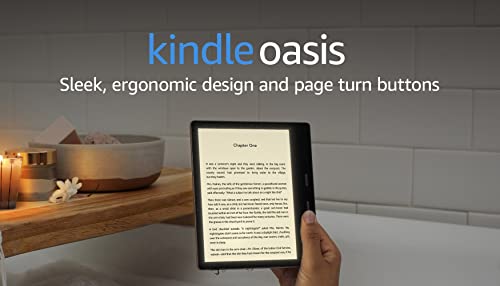
- Screen Size: 7 inch
- Resolution: 300 ppi e-ink screen
- Battery life: Up to 6 weeks
- Weight: 6.6 ounces
- Storage: 8 GB or 32 GB
Kindle Oasis (3rd generation) takes the spot as the Best reading tablet. You will use it for reading books as its core function since it is made as an e-book reader, not a multipurpose tablet.
It features a 7-inch screen size with a 300 ppi resolution display that is perfect for reading. The white and grayscale book-like display causes a high book-like contrast between the text and background.
If you are reading your books at night, it has a night light mode that you can set to protect your eyes. For people traveling to the beach or near water, the Kindle Oasis tablet comes with a waterproof body, durability is therefore assured.
For 30 minutes of daily reading time, the battery will go for up to 6 weeks without having to charge it. Unfortunately, it lacks a USB-C connector and audio jack for those who like listening to their books as they read. Storage is low at 8 and 32 GB but will be enough for many books because of their small file sizes.

Pros
- Long 6 week Battery life with fast charging
- Large 7-inch screen with 300 ppi resolution
- Night light setting with high black and white contrast display
- 8 and 32 GB to save your books
Cons
- Not waterproof
- Not a multipurpose tablet
- lacks a USB-C connector and audio jack
Samsung Galaxy Tab S9+ – best Android

- Screen Size and Resolution: 12.4 inches
- Resolution: 1752×2800 Pixels
- Screen Refresh Rate: 120 Hz
- Processor and RAM: Snapdragon 8 Gen 2
- RAM: 12 GB / 16 GB
- Battery Life: 10 hours
- Weight: 1.29 lbs
- Comes with Stylus: Yes
- Storage Space: 256 GB / 512 GB
- Operating System: Android 13
- Connectivity: USB-C port
If you prefer an Android system, the Samsung Galaxy Tab S9+ Plus is our pick for the best Android tablet for taking notes.
It is larger than the iPad Mini with a 12.4-inch screen with a 1752 × 2800 pixel resolution. Additionally, the screen is fast and responsive thanks to the 120 Hz screen refresh rate.
Samsung Galaxy Tab S9+ Plus has easily ousted its predecessor, Samsung Galaxy S8 Ultra, as the best iPad alternative to Android, thanks to its powerful features and affordable price range.
A powerfulSnapdragon 8 Gen 2 processor and 12 GB RAM with a 16 GB RAM option will ensure fast processing with minimal lags.
Unlike most iPads and Apple tablets, the Samsung Galaxy Tab S9+ Plus comes with Samsung’s S-Pen.
Unfortunately, you will have to keep buying replacement nibs, which are unavailable on purchase. You will also not get a charger or external keyboard. Overall, it is a good multipurpose tablet that will give iPads a run for their money.
Pros
- Powerful Processor and RAM.
- Comes with a Free Samsung S Pen
- DEX Mode compatible
- Large screen with good resolution
- Long battery Life at 10 hours
Cons
- No charger included
- Few Nibs available on purchase
Kindle Scribe: Best for reading and Taking Notes

- Screen Size: 10.2-inch
- Resolution: 300 ppi Paperwhite display
- Battery life: Up to 12 weeks
- Weight: 15.3 ounces
- Storage: 16/ 32 or 64 GB
The Kindle Scribe is another e-book reader similar to the Kindle Oasis (3rd generation), only bigger. It comes with a slightly larger 10.2-inch screen size but the same 300 ppi display resolution.
It also features a long battery life with up to 12 weeks at 30 minutes per day usage. If you like marking as you read, the Kindle Scribe comes with a pen that you can write on the screen with and is also compatible with MS Word.
You can therefore use it as both a reading and note-taking tablet. Unlike the previous tablet, the Kindle Scribe is not waterproof and faces a risk if you are using it near the pool.
It comes with a larger storage space but is still low with 16 and 32 GB sizes plus a maximum of 64 GB. This is enough for books but is very low compared to multipurpose tablets.

Pros
- Long Battery life
- Large 10.2-inch screen
- Works with MS Word
- Comes with pen
Cons
- Not waterproof
- More Costly
Microsoft Surface Pro 9 – Best Laptop Alternative

- Screen Size: 13 inches
- Resolution: 2880×1920 Pixels
- Screen Refresh Rate: 120 Hz
- Processor and RAM: Intel Core i5 / i7
- RAM: 8 GB / 16 GB / 32 GB
- Battery Life: 19 hours
- Weight: 1.94 lbs
- Comes with Stylus: No
- Storage Space: 128 GB / 256 GB / 512 GB / 1 TB
- Operating System: Windows 11 Home
- Connectivity: USB-C port
If you prefer a Windows system, then the Microsoft Surface Pro 9 is your best pick. It features a large 13-inch screen size with a 2880 × 1920 pixel resolution.
Although it does not come with the pen in the box, when you buy its native pen, you will quickly realise the fast screen responsiveness to the pen thanks to a high 120 Hz screen refresh rate.
If you like saving files on your tablet, you will have a wide choice of storage space sizes from 128 GB to 1 TB. Most written files are small in size and will not occupy too much space. 256 GB and above is perfect for reading and writing.
This tablet stands out for its powerful processor that will not only work as a writing tablet but also work without lags for multiple purposes, including drawing and gaming.
The Core i5 or i7 processors and 8 GB RAM are more than you need for notework writing. However, for more complex tasks, we recommend 16 GB or 32 GB RAM. This large RAM will allow seamless multitasking even with complex programmes running.
This tablet is slightly too big and may limit portability. However, 19 hours of battery life and 1.94 lbs overall weight make it ideal for outdoor usage.
Pros
- Powerful Processor and RAM options
- Large high-resolution
- ion screen
- Wide storage space options that are expandable
- Long Battery life
- Lightweight build
Cons
- A little too big for portability
- Pen comes separate
Amazon Fire HD 8 Kids Tablet (12th generation) – Best Budget
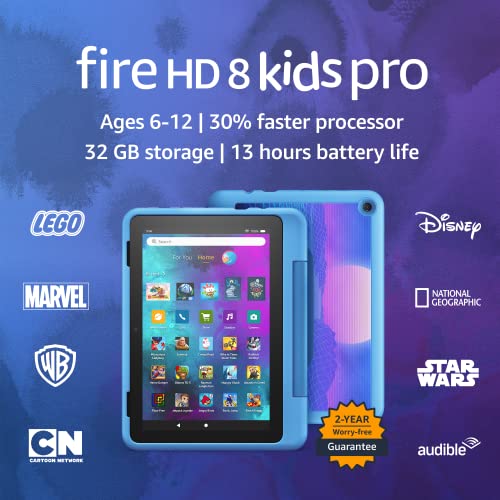
- Screen Size: 8-inch
- Resolution: 1280 x 800 Pixels with 189 ppi
- Battery life: Up to 13 hours
- Weight: 1.14 pounds
- Storage: 32 GB or 64 GB
- Processor: Hexa-core 2.0 GHz
If you are looking for a tablet for your kids, we recommend the Amazon Fire HD 8 Kids Tablet (12th generation). It is a large 8-inch tablet with 1280 x 800 Pixels and 189 ppi, made with kids in mind.
On purchase, it has a 2-year worry-free guarantee and a free 1-year Kids content subscription. You will however start paying for it after 1 year, which can be costly.
The initial purchase price of the tablet is low and very affordable. One downside is that the tablet runs on Amazon’s Fire OS and has compatibility issues when using Google Play.
All is however not lost because the Amazon Fire HD 8 Kids Tablet (12th generation) works perfectly with Amazon accessories such as Alexa.
Pros
- 2 years guarantee
- Free 1-year Kids content subscription on purchase
- Affordable Price
- Compatible with Amazon devices
Cons
- Not the best resolution
- You will have to pay after first-year Kids content subscription
- Not compatible with most Google Play Applications
13-inch iPad Pro (2024): best iPad for reading books

- Screen size: 13 inches
- Display: Ultra Retina XDR
- Resolution: 2752 x 2064 pixels
- Chip: Apple M4
- RAM: 8 GB/ 16 GB
- Storage: 256 GB 512 GB 1 TB 2 TB
- Non expandable storage
- Weight: 1.28 pounds
- Rear Camera: 12MP Wide
- Front Camera: 12 MP Ultra Wide with Center Stage
- Audio: Four speakers, four studio-quality microphones
- Battery Life: Up to 10 hours
- Connectivity: USB-C (Thunderbolt or USB 4), Wi-Fi 6E
- Security: Face ID
The new 13-inch iPad Pro (2024) and 11-inch iPad Pro (2024) are the only OLED iPads available. Their M4 Chip processor is also the most powerful of all iPads as well.
This model, part of Apple’s latest release, boasts an Ultra Retina XDR Tandem OLED display with a high resolution of 2064 x 2752 pixels and a pixel density of 264 ppi.
The display also includes True Tone and an anti-reflective coating, making it suitable for reading in various lighting conditions. With brightness levels reaching up to 1600 nits (HDR), it ensures clear visibility even in bright outdoor environments.
Weighing 579 grams and with a thickness of just 5.1mm, the 2024 13-inch iPad Pro is lighter than its predecessors and the thinnest product Apple has ever made. This slim, sleek build makes it easier to hold for extended periods, enhancing its suitability for reading books, magazines, and comics on the go.
The tablet’s 120 Hz screen refresh rate provides a smooth scrolling experience, which is particularly enjoyable when flicking through pages. Additionally, the M4 chip, which is the most powerful processor ever in an iPad, ensures that even though you might primarily use it for reading, it can handle more processor-intensive creative tasks with ease.
While the iPad Pro 13 is priced higher and includes features that extend beyond reading, it is the best choice for those who want the ultimate tablet experience.
The combination of the Ultra Retina XDR OLED display, lightweight design, and powerful performance makes it an unparalleled device for reading and much more.
If reading is your primary use case, you might consider a more budget-friendly and portable iPad. However, if you want the very best tablet available, the 13-inch iPad Pro (2024) is the one to get. We have previously compared the 13-inch iPad Pro (2024) and iPad Air.
Pros
- Cheap and affordable
- Long battery life
- Good dual-speaker sound quality
Cons
- Old slow processor
- Slow Charging
- Unusual Resolution and Aspect Ratio
What to Look for When Choosing a PDF Reading Tablet
- Price
- Screen and resolution
- Battery Life
- Storage Space
- Operating System
- Tablet Type
- Screen Type
There are several factors you need to consider when choosing the best reading tablet. First, you need to consider your budget. Most e-book readers are not expensive. You will spend more than 100$ on the best one.
If you however want a multipurpose tablet that you can use for different functions apart from reading, you will have to spend extra. Under this category, you will choose between Android-powered devices and iPads.
iPads have a better screen and resolution, on the other hand, Android tablets are cheaper and come with expandable storage using a MicroSD card.
Battery life is another important consideration. The longer the battery life, the more reliable a tablet is. 10 hours and above is recommended.
You need a reasonable screen size that is not too large that you can not hold it as you read and not too small to cause difficulty while reading. The most ideal option falls between 7 inches in size to 10 inches. For optimum performance around 300 ppi is best.

Types of reading Tablets
If you want a portable reading device, you can either use, E-readers, Multipurpose Tablets, or budget-level tablets. For Music readers check out our earlier posts.
E-readers are made for easy e-books and digital book reading. You can use them in high sunlight without issues because they are made to make your reading experience like a pen on paper.
Antiglare technology reduces eye strain while the overall design is made to maximize reading. Most E-readers have a black-and-white screen display with no color.
They feature a long battery life and minimal application pop-ups and interference on the screen. Kindle series and Kobo devices are the best examples.
If you need a tablet that you can use to read colorful and illustrated comics or view colorful images, a Multipurpose Tablet is the best. It has a high-resolution display with rich color display capability. They can be used for diverse functions like drawing or streaming depending on the type you buy. Samsung Galaxy Tab, iPads and Lenovo tablets are perfect examples.
If you are a beginner, you can consider choosing a budget tablet. They are not as good as high-end tablets but can be used for some diverse tasks for a fraction of the price. You can use them for basic reading or streaming functions but you will face challenges when you try using them for professional tasks like gaming or drawing. Many Amazon Fire Tablets are perfect examples.
Best Tablets for reading PDFs and Taking Handwritten notes
| Feature | Kindle Oasis | Amazon Fire HD 8 | Apple iPad mini |
|---|---|---|---|
| Best For | Best overall | Budget option | Best for Apple users |
| Screen Size | 7 inch | 8 inch | 1280 x 800 pixels (189 PPI) |
| Resolution | 300 ppi e-ink screen | 2266 x 1488 pixels (326 PPI) | 2266 x 1488 pixels (326 ppi) |
| Processor | N/A | Hexa-core 2.0 GHz | A15 Bionic chip |
| Battery Life | Up to 6 weeks | Up to 13 hours | Up to 10 hours |
| Weight | 6.6 ounces | 1.14 pounds | 10.4 ounces |
| Storage Options | 8 GB or 32 GB | 32 GB or 64 GB | 64 GB or 256 GB |
Frequently Asked Questions
What is the best reading tablet?
Kindle Oasis is the best e-book reader tablet for reading books. If you prefer a multipurpose tablet, we recommend the Apple iPad mini.
Which tablet size is best for reading?
Tablets between 7 and 10 inches are the best for reading books. This is because they offer a similar feel to holding a 6 to 9-inch size book. This is the most common book size. Consider the overall weight of your tablet so that it is not too heavy to carry.