

Windows tablets are compact, versatile devices that function very much like a Windows laptop, but with the advantage of greater portability and flexibility. Running the same Windows 11 or Windows 10 operating system as modern laptops, these tablets can be used as full PCs when paired with an external keyboard and mouse. Because of these similarities, they are often referred to as Windows tablet PCs.
With powerful specifications and performance, Windows tablet PCs can run nearly any application that a standard laptop can handle, despite their smaller size. Their adaptable design makes them ideal for a wide range of tasks, including drawing, graphic design, schoolwork, and even gaming.
In this post, we will explore the best Windows tablet PCs of 2026, highlighting options that combine high performance, portability, and premium features—all at a price that won’t break the bank.
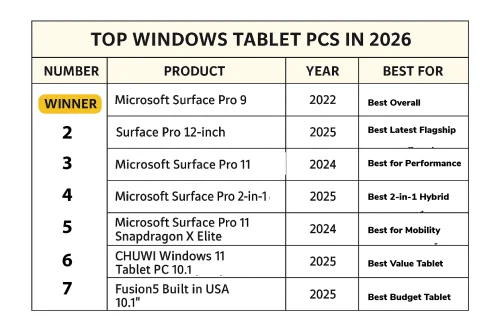
Top Windows Tablet Pcs in 2026
- Microsoft Surface Pro 9 (2022): Best Overall
- Surface Pro 12-inch (2025): Best Latest Flagship
- Microsoft Surface Pro 11 (2024): Best for Performance
- Microsoft Surface Pro 2-in-1 (2025): Best 2-in-1 Hybrid
- Microsoft Surface Pro 11 Snapdragon X Elite (2024): Best for Mobility
- CHUWI Windows 11 Tablet PC 10.1 (2025): Best Value Tablet
- Fusion5 Built in USA 10.1” (2025): Best Budget Tablet
Microsoft Surface Pro 9: Best Overall

If you prefer using your tablet in high-light outdoor settings, the Surface Pro 9 display has 453 nits brightness levels, which is okay, but I felt it could have been a little higher since this is one of their new premium-level tablets.
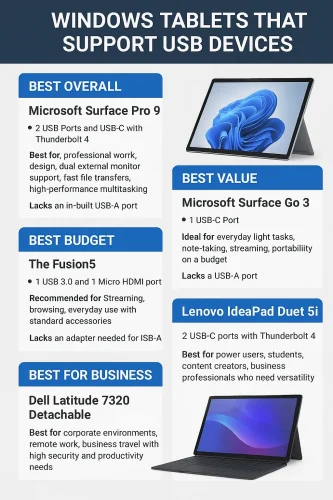
This tablet is perfect for streaming and will allow you to connect to even 2 external monitors at a go. This is made possible by 2 USB-C and 4 USB 4.0 Thunderbolt ports.
Microsoft Surface Pro 9 is a premium-level tablet and does not come cheap. However, it makes up for the price with powerful multipurpose features that will make it possible to use it for any professional tasks, even animation.
The tablet is powered by a powerful 12th-generation Intel Core i5 processor and 8 GB, 16 GB, and 32 GB RAM options. A dedicated Intel Iris Xe Graphics GPU, or graphic processing unit, further enhances this already powerful system.
As mentioned, this Windows tablet comes with 2 USB-C slots, which is perfect. Unfortunately, if you prefer an HDMI slot, you will notice Microsoft Surface Pro 9 does not support an HDMI connection.
The Microsoft Surface Pro 9 is best for business professionals who need a laptop-like tablet that balances between portability and performance. For those who need a cellular device, there is a cellular version with 5G connectivity that you can insert a SIM card into.
Touchscreen sensitivity and stylus support make it good for drawing and general creative work. Any application compatible with your Windows laptop is also compatible with the Surface Pro 9 since they have the exact same Windows 10 and 11 OS structure as laptops.

Pros
- Large screen Size and resolution
- Powerful processor and RAM
- 2 USB-C slots
- 4 USB 4.0/Thunderbolt Ports
- Long battery life
Cons
- Expensive
- Not compatible with HDMI
Surface Pro 12-inch (2025): Best Latest Flagship

The 2025 Microsoft Surface Pro 2-in-1 Tablet is a new Windows PC tablet you can rely on to kickstart your 2026. It was released in May 2025, so it is still relatively new. Based on its specs, it is ideal for business professionals and college students who need portability and versatility.
It is generally cheaper than the Surface Pro. It is priced at $765 for the 16 GB RAM option and 256 GB storage space configuration. If you need larger storage space, you can choose the 16 GB and 512 GB option at a slightly higher price.
Generally, this tablet features weaker specs compared to the Surface 9. It has a smaller screen size at 12″ with the same PixelSense touchscreen sensitivity. For a clear view, it has a 2196 x 1464 pixel resolution, which is perfect for creative work. The screen is wide with a 16:9 aspect ratio, making it comfortable to work or stream on.
If you need a Windows gaming tablet, the low refresh rate of 90 Hz will not be as good as the gaming experience on an iPad with 120 Hz. Additionally, the screen is slightly dimmer at 400 nits brightness. This is not a very big problem, and you will only notice when you try to use it in high-light conditions.
It works well with the Surface Pro 12″ Keyboard and Surface Slim Pen, but you must buy them separately, with the keyboard priced at $150. Whether you are using it for streaming or video conferencing with the in-built cameras at Front 2MP (4K capable) and Rear 10MP, this tablet will stay on for up to 16 hours without having to recharge.
Pros
- Large screen with high resolution
- Versatile with many uses
Cons
- Pen and keyboard bought separately
- Not as bright as iPads when using outdoors
What to Look for in a Windows Tablet Pcs
- Price range
- Processing Power; CPU, RAM, Storage and OS
- Display: Screen size, Resolution and refresh rate
- Connectivity: USB ports
- Accessories: Keyboard and stylus support
- Battery life and other standout features
When choosing a Windows tablet, you need to consider the price range and whether you can afford it for your task. Newer versions sometimes come at a more expensive price compared to older versions. For example, the Microsoft Surface Pro 9 (2022) was priced from $900, while the new Microsoft Surface Pro 11 (2024) ranges between $999 and $1299 despite having a smaller screen.
Power and performance are important considerations. This depends on what you want to do with the tablet. Consider the CPU or processor, RAM, storage space and operating system. For the best experience, we found that a dual-core processor provided faster and smoother performance.
Intel Core i5, Core i7, and Core i9 also work perfectly, especially when combined with 4 GB of RAM and above. Intel Core i3 processors were a little slower and could only be considered entry-level options.
If you intend to perform complex or professional tasks with your tablet, we recommend 8 GB of RAM and above. 4 GB will only be good for basic tasks like streaming, video conferencing, and photo editing. Screen size is also a key consideration.
Choose a tablet with at least a 10-inch screen size and Full HD 1920 x 1080 pixel resolution. For the battery life, at least 8 hours will get you through a full working day. Although cheap Windows tablets exist, the lower the price, the more you compromise on specifications.
Check whether the tablet is compatible with a detachable keyboard and pen, plus whether it comes with them. They make it easy to convert your tablet to a laptop and use it for more professional tasks.
Other factors you should have in mind include the battery life after a full charge and the number of USB ports. More USB ports increase your tablet’s versatility and connectivity.
Frequently Asked Questions
What is a Windows Tablet PC?
A Windows Tablet PC is a touch-sensitive tablet that uses a Windows operating system. It is made to work as both a tablet and a laptop when connected with a detachable keyboard and stylus. It is one of the best laptop replacement devices with better portability and equal power.
Can I use them for drawing or gaming?
Yes, Windows tablets are made to work like laptops and can be used for gaming thanks to a powerful processor and large RAM. A touch-sensitive screen and stylus pen compatibility ensure they are ideal for drawing.