

Tablets with the best cameras can no longer be ignored as reliable devices for video calls, photography, and strategic content creation.
They are not as good as smartphones for mobile photography, but their improved image processing, 4K video recording, wide dual cameras and powerful sensors make them reliable devices for complex tasks.
In 2026 it is possible to get a good one to use for YouTube, content creation, photography, online schooling and more. In this guide, we have researched and ranked top tablets with the best cameras that you can buy. Whether you prefer Android, Apple or Windows, this post has got you covered.
What Makes a Good Tablet Camera?
Before diving into it, it is important to understand what to consider when choosing a tablet with a good camera.
Consider both the front and rear camera quality. For the rear one, check the number of megapixels, sensor size, and image processing. The front camera will be used for meetings and selfies.
For shooting capability, consider the ability to shoot in 4K video quality. This is very essential if you are a content creator.
If you sometimes shoot in low light or need better quality and stabilisation, consider a tablet camera with inbuilt image stabilisation and HDR.
AI tools integration and overall software features will be an added advantage. Some common AI enhancements for tablet cameras include Center Stage and auto-framing.
Top Tablets With the Best Cameras in 2026
- Apple iPad Pro M4 (2024): Best Overall
- Samsung Galaxy Tab S11 Ultra – Best Android camera tablet
- Apple iPad Air (M2) 2024 – Best balance
- Apple iPad Air (M3) 2025 — Best Compact Tablet With Great Cameras
- Samsung Galaxy Tab S9+ – Great premium Android option
- Samsung Galaxy Tab A9+ – Best budget tablet
Apple iPad Pro M4 (2024): Best Overall
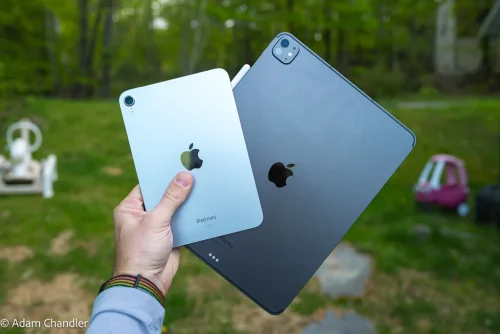
If you’re searching for the best overall camera on a tablet, the iPad Pro M4 (2024) stands at the top. It delivers a professional-grade camera system designed for creators, professionals, and anyone who wants exceptional photo and video quality in a portable device.
The rear camera features a powerful 12MP wide lens capable of recording stunning 4K UHD (2160p) video, including support for ProRes. Whether you’re shooting YouTube content, product videos, or cinematic clips, the image quality is sharp, detailed, and colour-accurate.
With Adaptive True Tone flash and an advanced LiDAR scanner for precise depth mapping, it handles low-light scenes and AR applications with impressive accuracy.
Powered by the M4 chip, the tablet processes high-resolution footage smoothly — even demanding 4K 120fps 10-bit RAW video — making editing fast and seamless.
On the front, the 12MP ultra-wide camera is positioned in landscape orientation, making it perfect for video calls and live streaming. It supports 4K recording and features Center Stage, which intelligently keeps you in frame during video conferences. Portrait mode enhances selfies with natural background blur, while seamless Face ID integration ensures secure authentication and payments.
Audio quality matches the visuals. With four studio-quality microphones for clear voice capture and a four-speaker audio system for immersive playback, the iPad Pro M4 is built for serious content creation.
Best For: Content creators, YouTubers, business professionals, and anyone who wants top-tier video performance and the best overall tablet camera experience.
Samsung Galaxy Tab S11 Ultra

If you want a premium Android tablet with strong camera performance for creativity and productivity, the Galaxy Tab S11 Ultra delivers an impressive setup designed for modern content creators and professionals.
The rear camera system includes a 13MP main camera with ultra-wide support, paired with an additional 8MP ultra-wide lens. This dual-camera configuration allows you to capture wide-angle shots, group scenes, and creative perspectives with clarity.
The tablet supports UHD 4K video recording (3840 x 2160) at 30 fps, making it suitable for recording high-resolution video content, online tutorials, and professional presentations.
On the front, you get a 12MP ultra-wide camera designed specifically for video calls, live streams, and content creation. The wide field of view ensures you stay comfortably framed during meetings or recordings. While detailed stabilization and HDR specifications aren’t explicitly listed, the tablet leverages Samsung’s image optimization for enhanced visual output.
Beyond hardware, the Galaxy Tab S11 Ultra integrates Galaxy AI-powered tools to elevate productivity and creativity. Features like Note Assist help organize and summarize notes efficiently, while Drawing Assist enhances creative workflows. Combined with S Pen support, the tablet becomes a powerful tool for designers, students, and professionals alike.
Its large 14.6-inch Dynamic AMOLED 2X display delivers vibrant colors and deep contrast, making video playback and content editing immersive. Powered by the MediaTek Dimensity 9400+ processor, the tablet handles multitasking, editing, and creative tasks smoothly.
Best For: Android users, creatives, business professionals, and anyone seeking a large-display tablet with strong 4K video capability and advanced productivity features
Apple iPad Air (M2)—Best Balance of Price

If you want strong camera performance without paying pro-level prices, the iPad Air (M2) delivers the perfect balance of affordability and quality. It offers impressive imaging capabilities powered by Apple’s advanced M2 chip, making it ideal for students, creators, and professionals.
The tablet features 12MP cameras on both the front and rear, giving you consistent quality whether you’re capturing content or joining meetings.
The rear 12MP wide camera supports 4K UHD (2160p) video recording, producing sharp, vibrant footage suitable for YouTube videos, online courses, and social media content. With both optical and digital video stabilization, your videos remain smooth even when shooting handheld. HDR video capture further enhances contrast and color accuracy.
On the front, the 12MP ultra-wide camera is positioned in landscape orientation, which feels natural during video calls. It supports Center Stage, automatically keeping you framed as you move—perfect for presentations, Zoom meetings, or live streams. Portrait mode also enhances selfies with professional-looking background blur.
Although Apple doesn’t publish detailed sensor size information, the M2 chip powers advanced computational photography, ensuring better image processing, improved dynamic range, and faster editing performance directly on the device.
Additional features include stereo audio recording with dual microphones, seamless integration with iPadOS editing tools, and effortless sharing across Apple devices.
Best For: Students, content creators, remote workers, and professionals who want excellent camera performance and 4K video capability at a more accessible price than the Pro models.
Apple iPad Air (M3)—Best Compact
If you want a powerful yet compact tablet with excellent camera performance, the iPad Air (M3) 2025 is a standout choice. It combines advanced imaging, smooth 4K video, and next-level processing power in a sleek and portable design.
The rear 12MP wide camera captures sharp, detailed images and supports 4K UHD (2160p) video recording at up to 60 fps. Whether you’re recording tutorials, scanning documents, or filming social media content, the footage is crisp and professional.
It also includes True Tone flash for improved low-light shots and built-in document scanning capabilities. While Apple doesn’t publish the exact sensor size, the M3 chip with its 16-core Neural Engine enhances computational photography for better color accuracy, detail, and dynamic range. Hardware-accelerated processing further improves video editing performance directly on the device.
On the front, the 12MP Center Stage camera is optimized for video calls and selfies. It supports 4K UHD recording and features Center Stage technology, which automatically keeps you framed during meetings or livestreams. HDR support ensures balanced highlights and shadows, making video calls look natural and clear.
For video creators, the tablet supports both optical and digital video stabilization, ensuring smooth handheld footage. HDR is available on both front and rear cameras, and the M3 chip unlocks pro-level editing and processing features for demanding workflows.
Best For: Students, professionals, and creators who want a compact, powerful tablet with excellent 4K video quality and advanced computational photography without stepping up to the Pro lineup.
Samsung Galaxy Tab S9+ 5G (AT&T)—Best Mid-Range
The Galaxy Tab S9+ offers flagship-level performance with solid camera quality, making it a strong alternative to the Ultra model at a more accessible price point. For Android users who want premium features without going all the way to the Ultra tier, this tablet delivers excellent value.
The rear 13MP camera with autofocus captures sharp photos and records 1080p Full HD video. While it does not support 4K recording, the footage remains clear and suitable for online content, presentations, and everyday video capture. Image processing is powered by the Snapdragon 8 Gen 2 processor with Adreno 740 GPU, ensuring fast rendering and smooth performance when editing or sharing media.
On the front, the 12MP ultra-wide camera provides better framing during video calls, making it ideal for meetings, online classes, and group conferencing. Although 4K recording is not listed, the front camera delivers clear and professional-looking video for everyday communication.
The tablet runs on Android 13 and includes DeX Mode, allowing a desktop-like experience when connected to a keyboard or external display—perfect for productivity-focused users.
Best For: Android users who want premium build quality and strong camera performance without stepping up to the Ultra model.
Samsung Galaxy Tab A9+ – Best Budget
If you’re on a budget but still need clear video calls and decent rear photos, the Galaxy Tab A9+ provides reliable everyday performance at an affordable price.
The 8MP rear camera captures decent images and supports 1080p Full HD video recording. While it doesn’t include advanced features like 4K video, HDR, or optical stabilization, it performs well for casual photography and basic video recording.
The tablet is powered by a Qualcomm Snapdragon 600 Series processor, which handles everyday image processing tasks efficiently. Notably, there is no flash included.
The 5MP front camera is designed for video calls and conferencing. It supports platforms like Zoom and other communication apps, making it suitable for students and remote users. Advanced stabilization and HDR features are not specified, but the camera performs adequately for its price range.
Running on Android 14 with Samsung One UI, the Galaxy Tab A9+, offers a smooth and user-friendly experience.
Best For: Students, casual users, and budget buyers who want a dependable tablet for video calls, streaming, and light photography without spending premium prices.
How to Choose the Best Tablet Camera
Choosing the best camera for your tablet is very similar to choosing a budget camera. Some of the most important specifications that overlap between the two include the camera’s resolution in megapixels, video shooting capability, resolution and burst rate. For cameras, the type of camera (either DSLR, mirrorless, or compact), budget, and overall AF, or autofocus.
- Image Quality and Autofocus
- Resolution
- Low-Light Performance
- Video Shooting Capabilities
- Budget and Pricing
- Portability and ergonomics
Image Quality and Autofocus
Choose cameras with large, high-quality sensors and lenses. Although more megapixels do not necessarily mean better quality, consider a camera with a high megapixel count. To avoid shaky footage, consider specific features like auto image stabilisation and RAW file support.
Choosing a camera with inbuilt Optical Image Stabilisation (OIS) is important for reducing blur caused by movement. This improves the photo and video clarity significantly.
For the best clarity, choose cameras with 4K or 1080p video recording capability. A camera with high autofocus speed allows you to capture images in low light or moving scenes.
Resolution
The resolution will determine how clear your footage will be. Higher-resolution cameras will provide the best video quality and give your videos a professional look. Low resolution will have clarity issues, and your viewers will have problems viewing your videos.
Low-Light Performance
Better light performance is always a plus for cameras. It allows you to shoot even in low-light conditions. Good low-light performance is usually evidenced by a large sensor or image stabilisation. Additionally, high ISO range cameras have better noise reduction capabilities.
Video Shooting Capabilities
The quality of the video recorded depends on the camera quality. For the best experience, we recommend cameras with 1080p resolution and high frame rate. 4K video, slow motion, and Wi-Fi connectivity are added advantages.
For the best experience, choose tablets with high resolution, such as 12 MP or higher on the rear cameras. Additionally, consider tablet cameras with a large sensor. These cameras offer better noise reduction and image quality.
Budget and Pricing
Many budget-friendly tablet options offer great camera value for your money. Before you buy, make sure to understand your needs and find one that works best for you.
Portability and ergonomics
If you intend to use your tablet camera for sports and outdoors, you need a tablet with good ergonomics for grip that is lightweight too. Your device should be easy to carry so that you don’t feel any discomfort when capturing events.
Focal length refers to the level of magnification your camera offers. Most tablet cameras have fixed focal lengths, so you can’t zoom, while others have zoom lenses that allow you to zoom in on the action. Try to get a camera with a large focal length and zoom capabilities.
Tablet Camera Buying Advice
If you want a tablet camera for simple vlogging or video conferencing, you will have to consider the front camera quality.
Considering the different lenses on tablets and their aperture sizes, a lower f-number allows more light into the camera and results in clearer images in low-light conditions. A good example is the (like f/1.8) aperture size.
Tablet specifications like a powerful processor, large RAM, long battery life, large screen, and resolution are also important considerations to have in mind.
For the best experience, we recommend cameras with powerful RAM and processors to handle video and image processing. AI-powered camera modes on tablets are an added advantage.
Conclusion
There are different operating platforms you can choose when using a tablet camera. You either use iOS, Android, or Windows OS tablets.
iPad Cameras
If you prefer iOS operating systems, the Apple iPad Pro 13-inch and the Apple iPad Air are your best options. The iPad Pro 13-inch features a 12MP Ultra Wide front camera and a 12MP Wide back camera with ProRes support, plus a LiDAR scanner.
For those who need a photography iPad, the Apple iPad Air is the best pick. It features a 12MP ultra-wide front camera and a 7MP wide back camera.

Android Tablet Cameras
For those who prefer Android tablets, Samsung and Lenoveo are the top-ranking brands in the field. Samsung Galaxy Tab S9+ features a 12.4” AMOLED display with a sharp quality display, ideal for Photo editing and taking video calls.
The Lenovo Tab P12 Pro features the best battery experience with 10 to 12 hours of continuous use. It features a 12.6” AMOLED screen with dual cameras set up at 13 MP and 5 MP).

Windows Tablet Cameras
Microsoft Surface Pro 9 and Lenovo ThinkPad X1t Table are the best for Windows users. They feature an OS similar to Windows computers and Laptops.
The Surface Pro 9 has a 13-inch PixelSense display and 10 and 5 MP rear and front cameras respectively. It ensures high-quality photo editing and video calls. Lenovo ThinkPad X1t features a similar 13-inch display and a smaller 8 and 5 MP rear and front cameras respectively.
Frequently Asked Questions
Are tablet cameras A better option than smartphone cameras?
Despite a great improvement, in quality, Tablet Cameras are still not as good as Smartphone camera.